

⛏️ Definitive Ore Miner – Minecraft Bedrock
Mine connected ores faster with customizable mining areas, shapes, and a real-time mining preview.
Have you ever wanted to mine blocks more efficiently and quickly? Definitive Ore Miner is a Minecraft Bedrock addon designed to make mining faster and less repetitive by allowing connected and supported blocks to be processed consecutively from a single mining action.
The addon is designed to work alongside other Minecraft Bedrock addons and does not use player.json.
⭐ Why Download Definitive Ore Miner?
Definitive Ore Miner goes beyond a basic vein-mining system. It includes multiple mining areas, geometric mining shapes, progressive processing, configurable durability costs, particles, action bar information, and several other options that let you adjust the mining experience.
🎥 See It in Action
⛏️ Features
👁️ Real-Time Mining Preview
Definitive Ore Miner now shows which blocks will be affected before you start mining.
The preview works in every direction, including walls, floors, and ceilings. Particle density automatically adjusts depending on the mining area size, using fewer particles for a cleaner preview.
The first block now breaks normally without constantly cancelling or restarting the mining animation.
🔨 Vein Mining
Definitive Ore Miner now mines only actually connected ores from the mining action.
The ore detection system was reworked so it can no longer detect ores hidden behind large amounts of stone.
Tool tier detection was improved to prevent pickaxes from mining blocks they normally should not be able to break.
Support was also improved for custom pickaxes that correctly use Minecraft tool tiers.

📦 Base Blocks
Sets the maximum number of blocks that can be mined in a single use. The miner continues following the selected mining pattern until it reaches this limit or there are no more valid blocks to mine.
📐 Mining Area
Changes the size of the mining area around the main direction.
The selected area also affects the size of geometric mining patterns such as Circle, Triangle, and Cross.
🔷 Mining Shape
Changes the pattern used while mining.
🚀 Progressive Mining
Instead of breaking every block at once, blocks can be mined progressively over time. This creates a smoother animation and can reduce lag when mining large areas.
Progressive Speed
🕵️ Enable Only When Sneaking
When enabled, Ore Miner only activates while you are sneaking. Disable this option to allow it to work without crouching.
✨ Mining Particle
Enables or disables mining particle effects. The real-time mining preview now uses fewer particles, and preview particle density automatically adjusts depending on the selected mining area size.
💎 Only Ores
When enabled, the miner only breaks ore blocks. When disabled, it can also mine stone and other supported blocks.
📊 Show Actionbar
Shows an action bar displaying the number of blocks mined and the current progress.
📦 Drop Blocks
Controls whether mined blocks drop their normal items.
🛠️ Mining & Tool Improvements
Fortune support, Silk Touch behavior, XP drops from ores, and Unbreaking support were improved.
Tool tier detection was improved, and compatible custom pickaxes using Minecraft tool tiers are better supported.
⚡ Performance Improvements
Performance was significantly improved when using large mining areas. Tunnel mining was also optimized to avoid unnecessary block scanning.
⚙️ Configuration System
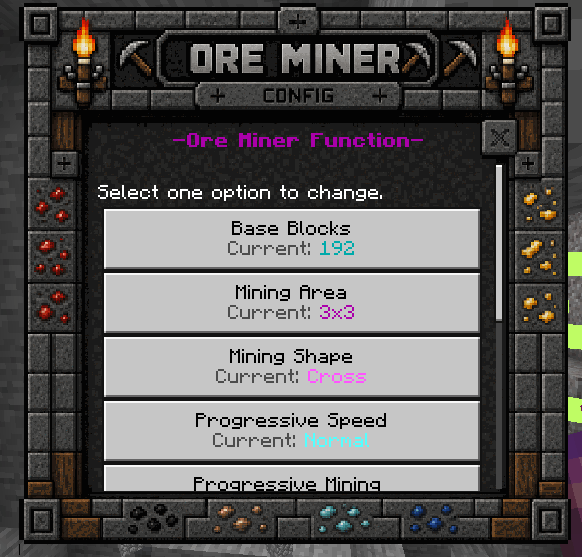
The Configuration Book includes a custom UI and allows you to control the main Ore Miner systems directly in-game.
🆕 Changelog
⛏️ Latest Update – Real-Time Preview & Mining Improvements
👁️ Real-Time Mining Preview
- Added a new real-time mining preview.
- You can now see which blocks will be affected before you start mining.
- The preview works in every direction, including walls, floors, and ceilings.
- Improved the preview to use fewer particles and look cleaner.
- Preview particle density automatically adjusts depending on the mining area size.
- The first block now breaks normally without constantly cancelling or restarting the mining animation.
✨ Enchantments & Drops
- Improved Fortune support.
- Improved Silk Touch behavior.
- Improved XP drops from ores.
- Improved Unbreaking support with the Ore Miner system.
🛠️ Tool Tier & Custom Pickaxes
- Improved tool tier detection to prevent pickaxes from mining blocks they normally should not be able to break.
- Improved support for custom pickaxes that correctly use Minecraft tool tiers.
⛏️ Ore Detection
- Reworked the ore detection system so it only mines actually connected ores.
- The addon can no longer detect ores hidden behind large amounts of stone.
⚡ Performance
- Significantly improved performance when using large mining areas.
- Optimized tunnel mining to avoid unnecessary block scanning.
V1.10.6 – Pickaxe Durability Cost
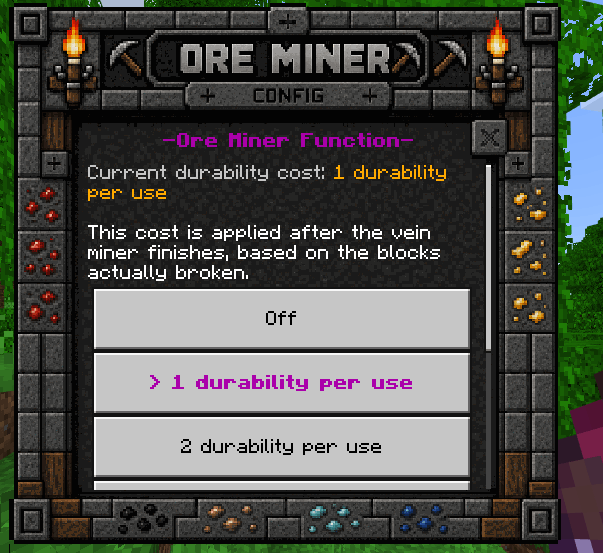
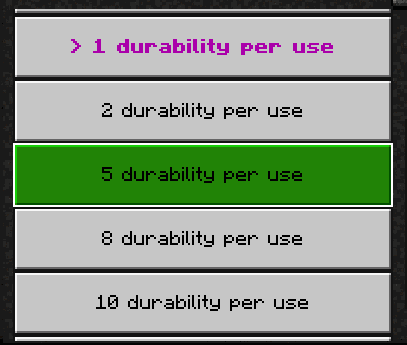
Added an option to change the durability cost applied to pickaxes when using the Vein Miner feature.
The durability cost can be configured from 1 to 10 durability points per use.

V1.10.5 – New Configuration Book UI
Added a new custom UI for the Configuration Book and introduced several settings for greater control over the Ore Miner experience.
- Base Blocks – Maximum blocks that can be mined in one use.
- Mining Area – Line, 1x2, 2x2, 3x3, 4x4, or 5x5.
- Mining Shape – Line, Stair, Circle, Triangle, or Cross.
- Progressive Speed – Slow, Normal, Fast, or Very Fast.
- Progressive Mining – Processes blocks progressively over time.
- Enable Only When Sneaking – Controls crouch activation.
- Mining Particle – Enables or disables mining particles.
- Only Ores – Restricts the miner to ores when enabled.
- Show Actionbar – Displays mined blocks and progress.
- Drop Blocks – Controls whether blocks drop items.
V1.2 – Compatibility & Enchantment Support
Added compatibility with newer Minecraft versions and optimized the code for better performance.
Added support for:
- Fortune
- Silk Touch
In this version, the feature activates by crouching and mining the desired block. Mining without crouching breaks the block normally.
📖 Configuration Book Recipe
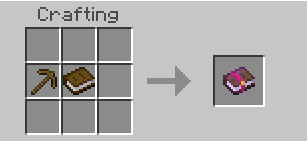
If you lose the Configuration Book, you can craft it again using the recipe below and obtain a new one from the Crafting Table.
🧩 Compatibility
If you upload or review this addon on an external website, use the link to the official page rather than direct download links or links created separately.
⬇️ Downloads
Download the latest version of Definitive Ore Miner for Minecraft Bedrock.
✅ No Experimental Features Required · ✅ No player.json · ✅ Compatible with other Add-ons


