

🛡️ Block Armor – Minecraft Bedrock
32 complete armor sets made from Minecraft blocks, with 22 unique armor powers.
Block Armor turns vanilla Minecraft blocks and materials into complete armor sets with their own block-based appearance, protection, durability and repair materials.
V3.0 includes 32 complete armor sets and 22 different armor types with special abilities, including dynamic lighting, projectile damage reduction, bonus XP, automatic food cooking, wolf buffs, fall protection, water freezing and much more.
🔥 Block Armor V3.0
A Major Ability Expansion
V3.0 greatly expands the original addon by giving many armor sets their own gameplay mechanics and by rebuilding several older abilities to make the different sets more useful and distinct.
🆕 10 New Armor Powers
- 💜 Amethyst Armor — Projectile Damage Reduction
- 🪨 Stone Armor — Resistance
- 📚 Bookshelf Armor — Bonus XP
- 🌿 Mossy Stone Brick Armor — Natural Regeneration
- 🍉 Melon Armor — Hunger Recovery
- 🟨 End Stone Armor — Automatic Slow Falling
- 🍯 Honey Armor — Slows Attackers
- 🦴 Bone Armor — Buffs Your Tamed Wolves
- ⚪ Quartz Armor — Haste
- 🏜️ Sand Armor — Speed on Sand
🔄 Reworked & Improved Abilities
- 🌾 Hay Bale Armor now reduces fall damage by 50%
- 🔥 Coal Armor now uses a much shorter 4-second cooldown
- 💡 Glowstone Armor now scales from Light Level 9 → 11 → 13 → 15
- 💎 Lapis Armor gives +1 XP per equipped piece and supports compatible custom pickaxes
- 🌋 Magma Armor scales retaliation damage and burn duration by equipped pieces
- 🟢 Slime Armor has clear Jump Boost progression by pieces worn
- 🍄 Mushroom Armor scales Poison duration by equipped pieces
- 🌵 Cactus Armor scales retaliation damage by equipped pieces
- 🧶 Wool Armor keeps its sleep mechanic with improved feedback and durability use
- ❄️ Ice Armor creates temporary Frosted Ice while walking across water
✨ 22 Armor Powers
Some abilities activate with only one armor piece and become stronger as more pieces are equipped. Other abilities require the complete four-piece set.
🧩 Piece-Based Abilities — 10
💜 Amethyst Armor — Projectile Protection
Each equipped piece reduces projectile damage by 8%.
- 1 Piece — 8% reduction
- 2 Pieces — 16% reduction
- 3 Pieces — 24% reduction
- Full Set — 32% reduction
🔥 Crying Obsidian Armor — Fire Resistance
Equipping at least one piece grants Fire Resistance. A full set is not required.
🟢 Slime Block Armor — Jump Boost
Improves jumping while pieces are equipped.
- 1–2 Pieces — Jump Boost I
- 3–4 Pieces — Jump Boost II
🌊 Prismarine Armor — Conduit Power
One or more equipped pieces grant Conduit Power, improving underwater breathing, visibility and mining utility.
💡 Glowstone Armor — Dynamic Light
Creates dynamic light that follows the player.
- 1 Piece — Light Level 9
- 2 Pieces — Light Level 11
- 3 Pieces — Light Level 13
- Full Set — Light Level 15
💎 Lapis Lazuli Armor — Ore XP
Breaking a recognized ore with a pickaxe grants bonus experience.
- 1 Piece — +1 XP
- 2 Pieces — +2 XP
- 3 Pieces — +3 XP
- Full Set — +4 XP
The system recognizes vanilla ores and compatible custom ores,
and supports custom pickaxes tagged as minecraft:is_pickaxe.
🌋 Magma Block Armor — Burning Retaliation
Enemies that hit you receive damage and are set on fire. Each equipped piece adds 0.75 retaliation damage, while additional pieces also increase burn duration.
🌵 Cactus Armor — Thorns
Enemies that hit you receive damage. Each equipped Cactus Armor piece adds 0.5 retaliation damage.
🍄 Red Mushroom Armor — Poison Retaliation
Enemies that hit you receive Poison. More equipped pieces increase the Poison duration.
🍯 Honey Armor — Sticky Defense
Enemies that attack you receive Slowness. More pieces increase its duration, and with 3–4 pieces the Slowness becomes stronger.
🛡️ Full Set Abilities — 12
🪨 Stone Armor — Resistance
Wearing the complete set continuously grants Resistance I.
❄️ Ice Armor — Frost Walker
The complete set temporarily converts water around your feet into Frosted Ice while you move across it.
🌾 Hay Bale Armor — Fall Protection
The complete set restores 50% of the damage received from a fall, effectively reducing fall damage by half.
🔥 Coal Armor — Instant Cooking
Wear the complete set, crouch and use raw meat to instantly cook one item.
The ability has a 4-second cooldown and consumes a small amount of armor durability.
Supported foods include beef, chicken, mutton, porkchop, rabbit, salmon and cod.
🧶 Wool Armor — Sleep Anywhere
At night, wear the complete set and Sneak + Interact to begin the sleep sequence and skip to daytime.
The ability consumes armor durability.
📚 Bookshelf Armor — Knowledge XP
The complete set rewards additional experience from normal gameplay.
- Breaking a recognized ore — +1 bonus XP
- Defeating an entity — +2 bonus XP
🌿 Mossy Stone Brick Armor — Natural Regeneration
The complete set grants slow Regeneration while standing on natural terrain such as grass, dirt, moss or mud.
🍉 Melon Armor — Hunger Recovery
The complete set gradually restores hunger, attempting a small recovery approximately once every 20 seconds.
🟨 End Stone Armor — Fall Safety
The complete set automatically activates Slow Falling when your downward speed becomes dangerous during a fall.
🦴 Bone Armor — Wolf Commander
The complete set buffs your own tamed wolves within 8 blocks with:
- Strength I
- Resistance I
Wild wolves and wolves owned by other players are ignored.
⚪ Quartz Armor — Haste
The complete set continuously grants Haste I.
🏜️ Sand Armor — Desert Speed
The complete set grants Speed I while standing on Sand or Red Sand. The bonus stops when you leave the sand.
🛡️ 32 Complete Armor Sets
Block Armor V3.0 contains 128 individual armor pieces across 32 complete sets.
Armor textures are based on Minecraft blocks, pieces can be enchanted, every set can be repaired with its matching material, and most sets support Minecraft Armor Trims.

✨ Armor Sets With Special Powers — 22
- Amethyst Armor
- Bone Armor
- Bookshelf Armor
- Cactus Armor
- Coal Armor
- Crying Obsidian Armor
- End Stone Armor
- Glowstone Armor
- Hay Bale Armor
- Honey Armor
- Ice Armor
- Lapis Lazuli Armor
- Magma Block Armor
- Melon Armor
- Mossy Stone Brick Armor
- Prismarine Armor
- Quartz Armor
- Red Mushroom Block Armor
- Sand Armor
- Slime Block Armor
- Stone Armor
- White Wool Armor
🧱 Additional Material Armor Sets — 10
- Andesite Armor
- Brick Armor
- Cobblestone Armor
- Diorite Armor
- Dirt Armor
- Gilded Blackstone Armor
- Granite Armor
- Log Armor
- Nether Brick Armor
- Oak Log Armor
These sets still provide their own protection, durability, enchantability, repair material and block-based appearance even when they do not have a special ability.
📖 Block Armor Config
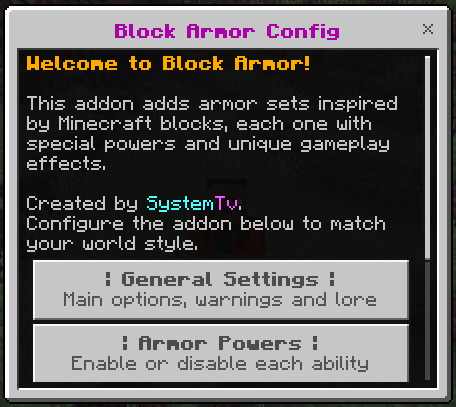
Block Armor includes a complete in-game configuration book. Every player receives the Block Armor Config item once when joining.

The book lets you:
- ⚙️ Configure general addon settings
- ✨ Enable or disable armor abilities
- 🎯 Disable individual armor powers
- 📜 Show or hide armor lore
- 💬 Enable or disable armor actionbar warnings
- 📖 Read detailed information about every armor ability
- 🔄 Reset the addon configuration
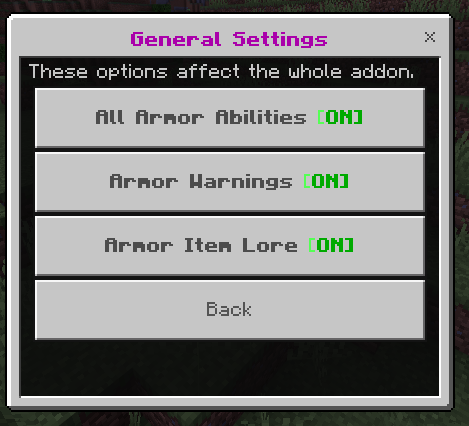
⚙️ General Settings
✨ All Armor Abilities
Master switch for every special armor power. Disable it if you want all 32 armor sets to behave as regular equipment without their special mechanics.
💬 Armor Warnings
Controls actionbar hints used by special mechanics such as Coal and Wool Armor.
📜 Armor Item Lore
Controls translated ability descriptions shown directly on armor items.
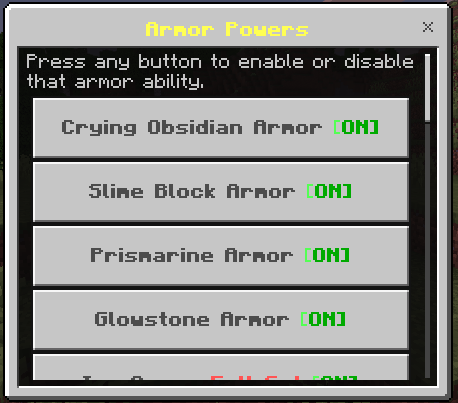
✨ Individual Armor Controls
V3.0 expands the Armor Powers menu to include all 22 special armor abilities.
Each armor has its own information page showing:
- What the ability does
- Whether it needs a full set
- How many pieces affect its strength
- Important activation conditions
- Current ON/OFF state
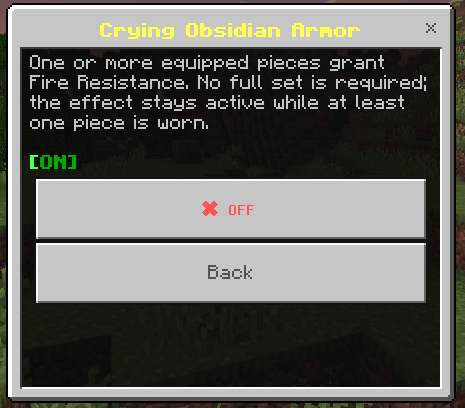
Every power can be enabled or disabled independently without disabling the other armor abilities.
📜 Smart Armor Lore
Every Block Armor item can display a short translated explanation of its ability directly in the inventory.
The lore identifies whether the armor has:
- Passive Ability
- Full Set Bonus
- No Special Ability
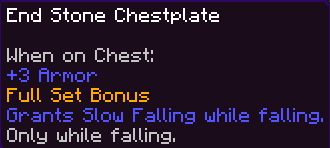


The lore automatically updates on armor obtained through:
- Crafting
- Commands
- Chests
- Drops
- Inventory changes
If you prefer clean item descriptions, disable Armor Item Lore from General Settings.
🌐 29 Language Variants
Block Armor V3.0 includes translated interface and armor-lore files for 29 language variants.
They include languages such as:
- English
- Spanish
- Portuguese
- French
- German
- Italian
- Japanese
- Korean
- Chinese
- Russian
- Ukrainian
- Turkish
- Polish
- Dutch
- And many more
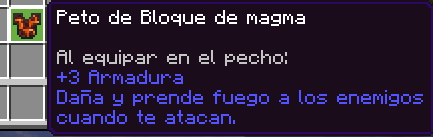
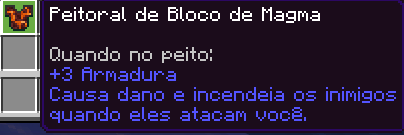
📕 Lost the Config Book?
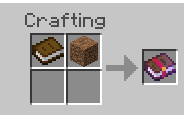
You can craft another Block Armor Config using:
- 📕 1 Book
- 🟫 1 Dirt
🧱 Crafting, Repairing & Enchanting
All Block Armor sets are survival craftable through the Crafting Table. Recipes normally follow vanilla armor shapes using the block or material represented by the armor.
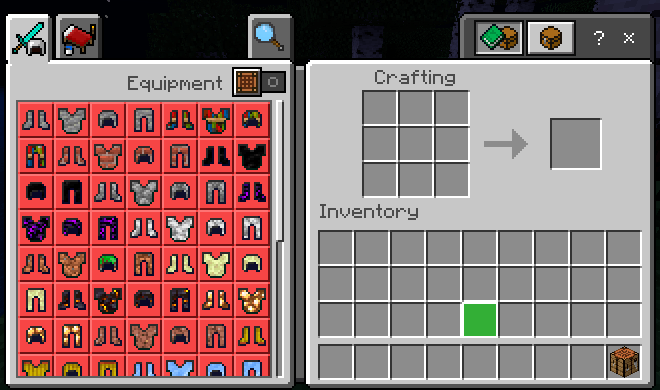
🔧 Repairing
Every armor piece can be repaired using its matching material. For example, Stone Armor can be repaired using Stone.
✨ Enchantments
All 128 armor pieces are configured to support normal Minecraft armor enchantments.
🎨 Armor Trims
Most Block Armor sets support Minecraft Armor Trims.
🎨 Texture Pack Compatibility
Block Armor uses Minecraft block textures for its armor appearance. Because of this, its visual style can naturally follow compatible texture packs that replace those vanilla block textures.
The addon is also designed to work alongside Action & Stuff.


✅ Compatibility
👥 Realms & Multiplayer
Block Armor can be used in multiplayer worlds and Realms.
🧩 Other Addons
Block Armor is designed to work alongside other Minecraft Bedrock addons.
🎨 Action & Stuff
The addon is designed to work alongside Action & Stuff.
🚫 No player.json
Block Armor does not use player.json, reducing conflicts
with addons that modify the player.
🧪 No Experimental Gameplay
V3.0 uses the stable Script API and does not require experimental gameplay toggles.
🏆 Achievements Friendly
Block Armor is designed to work without disabling achievements.
📦 Installation
Block Armor requires both packs:
- Block Armor BP — Behavior Pack
- Block Armor RP — Resource Pack
Both packs are required for the addon to function and display correctly.
- Import/install the Block Armor BP.
- Import/install the Block Armor RP.
- Activate both packs in your world.
- Enter the world.
- You will receive the Block Armor Config book the first time you join.
No experimental gameplay toggles are required.
📜 Previous Updates
V2.2.6 — New Armor Sets
Added Honey Armor, Quartz Armor, Bone Armor and Sand Armor with their own recipes, protection values and repair materials.
In V3.0, all four sets now also have unique special abilities.
V2.2.4 — Translations & Lore
Expanded translations for armor names, armor lore and the configuration interface, and added the option to hide armor descriptions.
V2.2.3 — Block Armor Config
Introduced the Block Armor Config book, global ability controls, individual armor-power settings, actionbar warnings, help information and configuration reset.
V3.0 significantly expands this system with detailed pages for all 22 current armor powers.
V2.2.0 — Mushroom & Hay Abilities
Added special abilities for Mushroom Armor and Hay Armor. Some older abilities were later redesigned in V3.0, especially Hay Armor, which now focuses on reducing fall damage.
🚀 Community & Support
Report bugs, suggest new armor ideas, follow addon development, see upcoming projects or request a custom Minecraft Bedrock commission.
If you showcase Block Armor in a video, review or external website, please send players to the official project page.
Do not redistribute the addon through your own direct download links.
⬇️ Download Block Armor
Download Block Armor for Minecraft Bedrock from the official CurseForge project page.
✅ 32 Armor Sets · ✅ 22 Armor Powers · ✅ Realms & Multiplayer · ✅ Achievements Friendly · ✅ No Experiments · ✅ No player.json


