

🔥 Torch Offhand – Minecraft Bedrock
Carry your light wherever you go.
Torch Offhand brings portable lighting to Minecraft Bedrock, allowing supported light sources to illuminate the area around you while you carry them in your main hand or offhand.
Version 4.0 adds per-player configuration, World / Admin Settings, Auto Refill, performance presets, independent Main Hand and Offhand lighting controls, configurable light distance, offhand placement, underwater lighting, and item lore settings.
🆕 Latest Update — V4.0
Torch Offhand V4.0 expands the configuration system and gives Realm, multiplayer, and world owners more control over performance and player options. It is updated for Minecraft Bedrock 26.50.
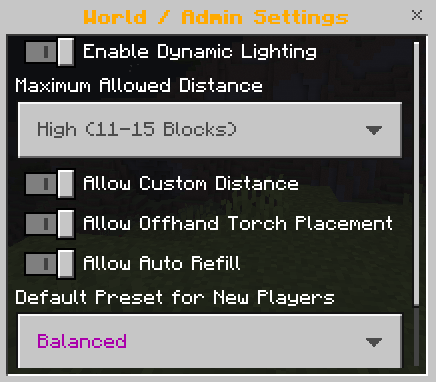
🌍 World / Admin Settings
Hosts, operators, and players with the admin tag can configure rules for the entire world:
- Enable or disable Dynamic Lighting globally.
- Set the maximum light distance players are allowed to use.
- Allow or block Custom Light Distance.
- Allow or block offhand torch placement.
- Allow or block Auto Refill.
- Choose the default preset for new players.
🔁 Auto Refill Offhand
When an offhand light source is used or runs out, Torch Offhand can refill the slot with the same supported item from the player's inventory. It will not replace a different item already occupying the offhand.
Players can enable or disable Auto Refill for themselves, while world admins can allow or block the feature globally.
⚡ Performance Presets
- Performance — lighter settings for mobile devices, Realms, or demanding worlds.
- Balanced — the recommended setup for most players.
- Maximum Lighting — stronger lighting for the brightest experience.
Players can reset their personal settings to the world's default preset, and admins can decide which preset new players receive.
🎨 Configuration & Language Improvements
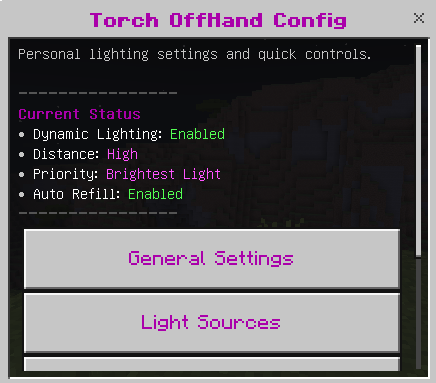
- Improved status information inside the Torch Config Book.
- Improved interface colors and menu organization.
- Updated English, Spanish (Spain), and Spanish (Mexico) translations.
- Updated support for newer Minecraft Bedrock versions.
📜 Update 3.9.6
- Added per-player configuration.
- Added separate Main Hand and Offhand lighting controls.
- Added Light Priority and configurable offhand activation modes.
- Added individual Light Source Settings and Custom Light Distance.
- Improved Lighting Lore and cleaned duplicated lore lines.
- Optimized the main lighting loop and multiplayer cache cleanup.
📜 Update 3.9.4
- Added the Torch Config Book and custom-textured configuration UI.
- Added offhand torch placement with Sneak + Hit.
- Added Torch, Soul Torch, Redstone Torch, Sea Pickle, and Copper Torch support.
- Added custom light distance, lighting lore, and underwater lighting information.
🌊 Underwater Lighting
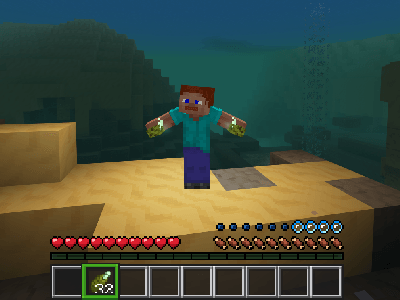
Lighting was added to the Sea Pickle.
It can also be placed in the offhand by interacting with the item or by crafting its offhand version, and it can illuminate underwater.

💡 Supported Light Sources
Torch Offhand supports multiple portable light sources, and each one can be individually enabled or disabled from the player's configuration.
- 🔥 Torch
- 🔵 Soul Torch
- 🔴 Redstone Torch
- 🌊 Sea Pickle
- 🟠 Copper Torch
Because configuration is stored per player, one player's choices do not change another player's settings.
📕 Torch Config Book
The Torch Config Book gives each player access to their own Torch Offhand settings, including lighting controls, priority, distance, supported light sources, offhand activation, and lighting lore.

🌍 World / Admin Settings
World owners and operators can control global lighting, maximum distance, custom distance, offhand placement, Auto Refill, and the default preset for new players.
🔁 Auto Refill & Presets
Enable Auto Refill to replace a used offhand light source from the inventory. Choose Performance, Balanced, or Maximum Lighting, or reset personal settings to the world default.
🖐️ Main Hand & Offhand Lighting
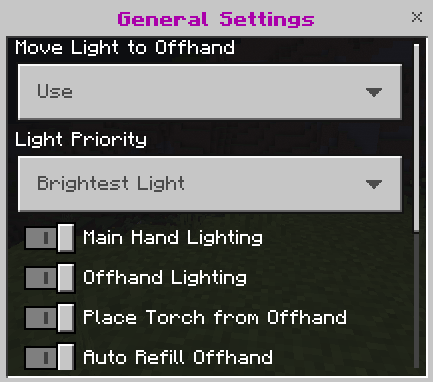
Main Hand Lighting and Offhand Lighting can be enabled or disabled independently.
✨ Light Priority
Choose which light should be prioritized when supported light sources are held in both hands:
- Prefer Offhand
- Prefer Main Hand
- Brightest Light
📏 Light Distance
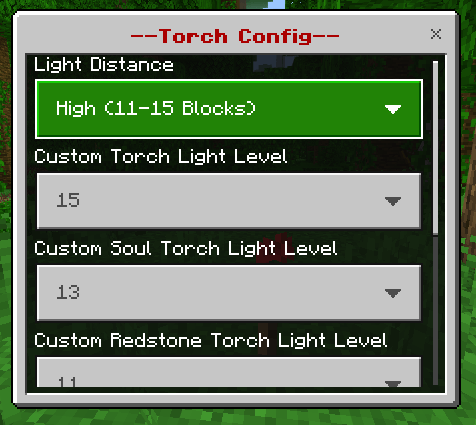
Choose Low, Medium or High, or use Custom Light Distance for individual supported light sources.
🔥 Light Sources
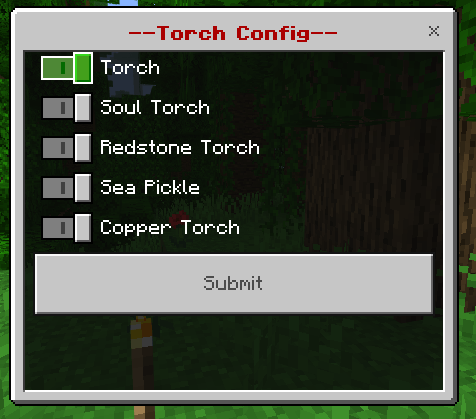
Individually enable or disable Torch, Soul Torch, Redstone Torch, Sea Pickle, and Copper Torch.
🖐️ Offhand Activation
Choose how supported light sources are moved to the offhand:
- Use — use the light item while looking at the air.
- Sneak + Use — sneak and use the light item while looking at the air.
- Disabled — disable automatic offhand activation.
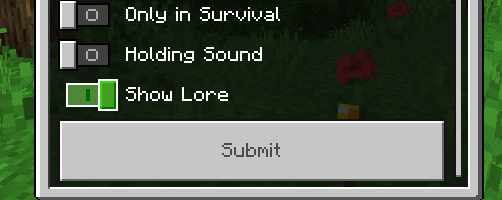
📖 Show Lighting Lore
Choose whether supported items display lighting information. When enabled, the displayed lighting distance updates to match the player's current light distance configuration.
When disabled, lighting information is completely hidden.
🔥 How It Works
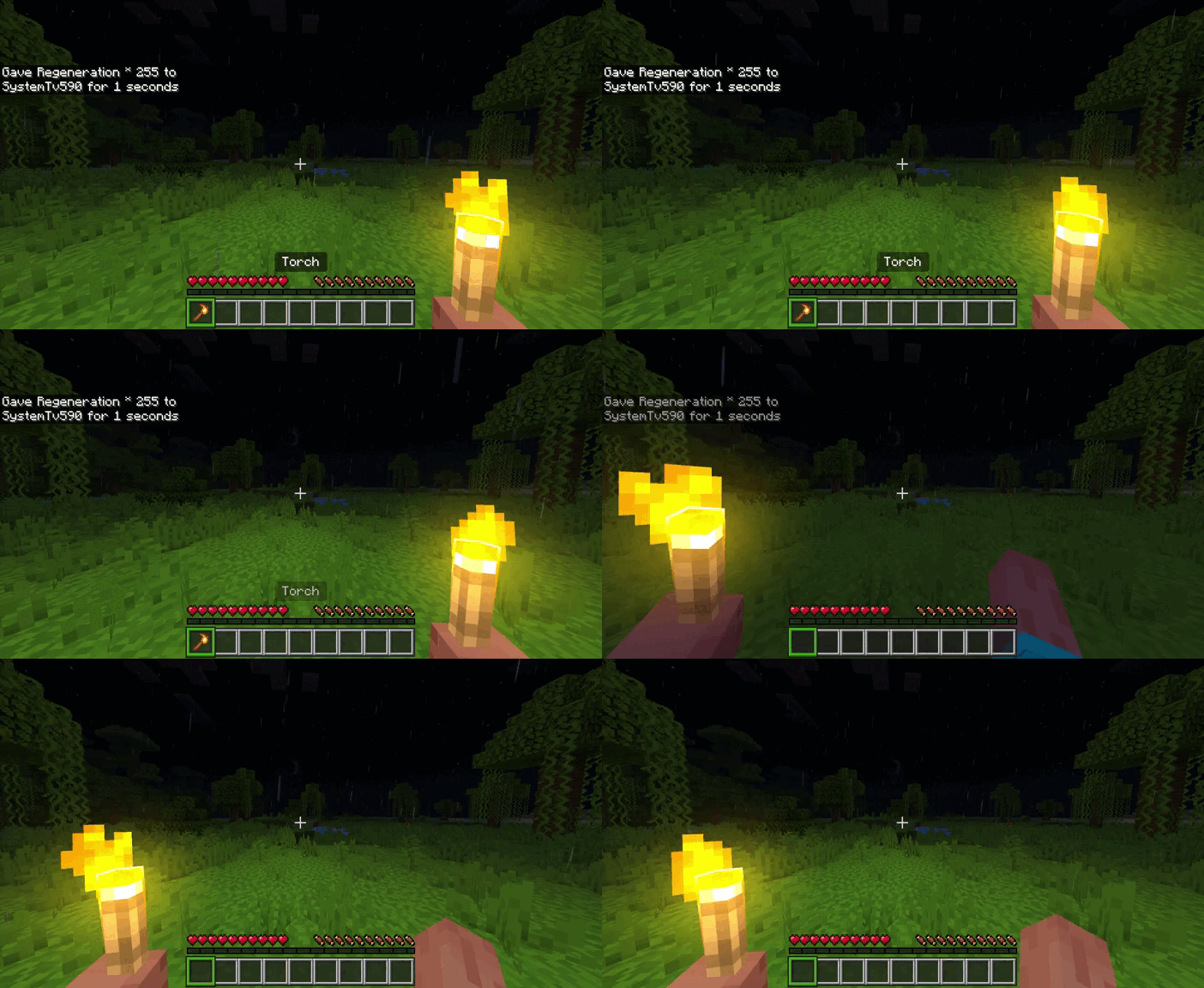
Supported light sources illuminate the area while held in the main hand or offhand.
🤚 Moving Light Sources to the Offhand
Supported light sources can be moved to the offhand while keeping the main hand available.
To prevent conflicts with normal block placement, supported light items move to the offhand only when activated while looking at the air.
Offhand activation can be set to Use, Sneak + Use, or Disabled.
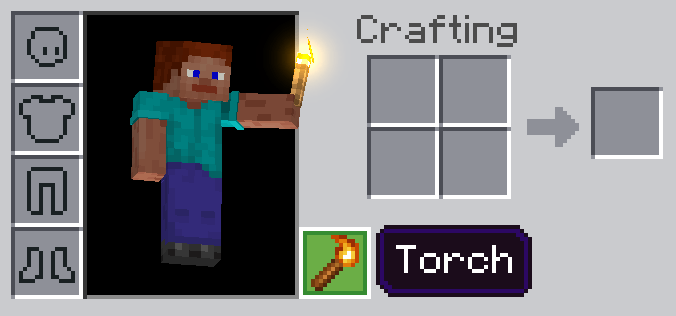
🧱 Place Torches From Your Offhand
Place torches directly from the offhand using Sneak + Hit on the block where you want to place the torch.
A torch must be in the offhand and the Place torches while sneaking option must be enabled.
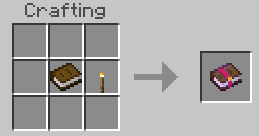
📘 Torch Config Book Recipe
The Torch Config Book is given to the player when entering the world for the first time. It cannot be lost upon death.
If it is dropped or stored somewhere and can no longer be found, another one can be crafted using the following recipe.
🧩 Compatibility
🏆 Achievements
Torch Offhand does not disable achievements.
🌐 Multiplayer & Realms
Torch Offhand supports multiplayer worlds and Realms. Each player can use their own configuration without changing other players' settings.
🧩 Other Add-ons
Torch Offhand is compatible with other Add-ons.
🎨 Action & Stuff
Torch Offhand is compatible with Action & Stuff.
👤 No player.json
Torch Offhand does not use player.json.
🧪 No Experimental Features
The addon does not require experimental gameplay.
📥 Installation Guide
Torch Offhand V4.0 is distributed as a single .mcaddon package. Open the downloaded file with Minecraft and wait for the behavior and resource packs to finish importing.
Edit your world, activate the imported Torch Offhand packs, and enter the world. No Experimental Features are required.
⬇️ Download Torch Offhand V4.0
Download the complete Torch Offhand V4.0 package for Minecraft Bedrock 26.50.
✅ Achievements Friendly · ✅ Realms Compatible · ✅ No Experimental Features · ✅ No player.json
.jfif)


